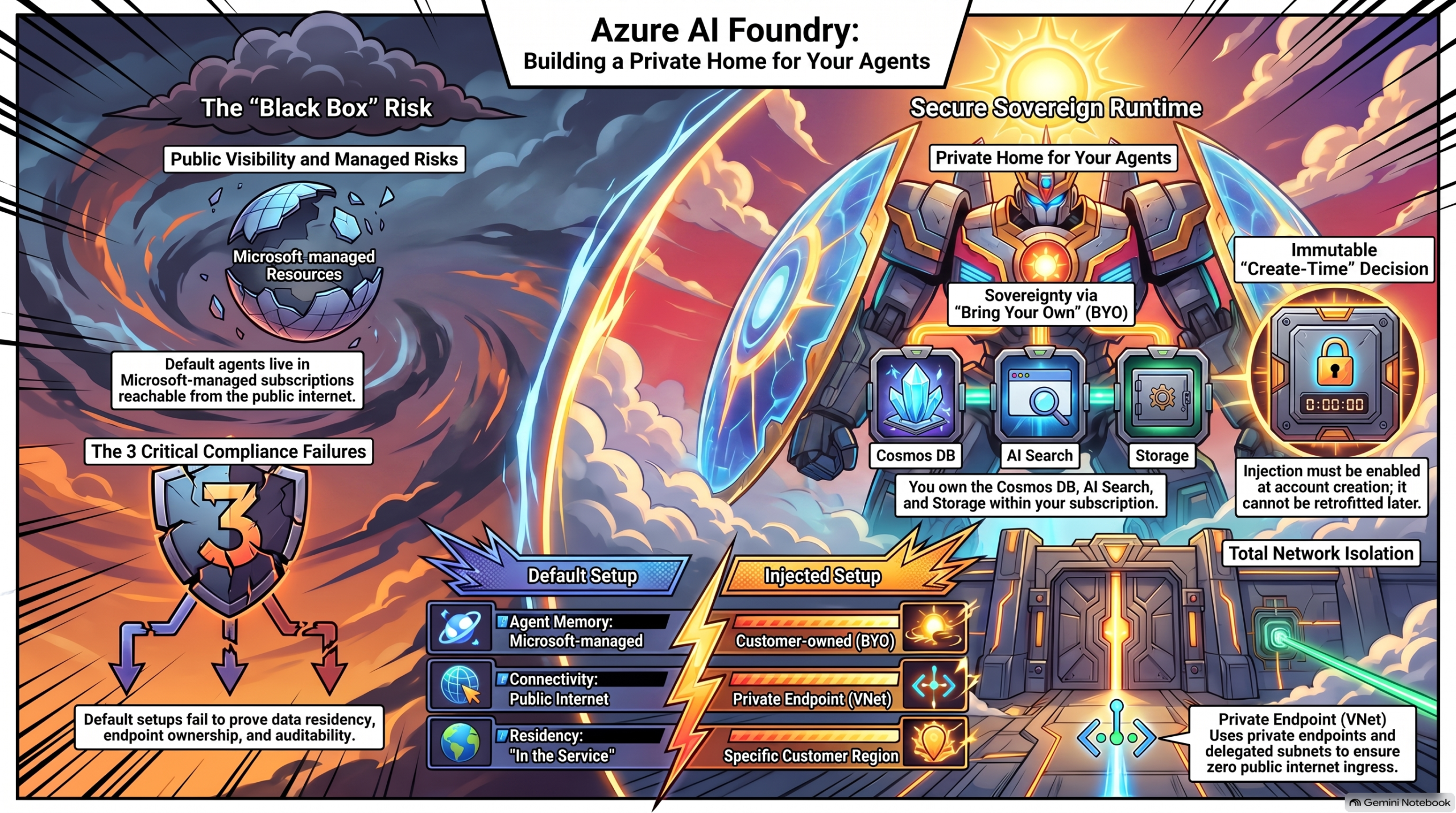
Recently I built a fully network-isolated Azure AI Foundry environment in Switzerland, and once again I found myself jumping between half a dozen Microsoft Docs pages, GitHub issues and my own notes just to understand what network injection actually is, why anyone would go through the pain of setting it up, and which parts of the official guidance are – let’s say – optimistic. So, in good ConfigRoar tradition, here is the one article I wish I had before I started: what Foundry network injection is, why regulated customers in Switzerland (and everywhere else) ask for it, and the best practices and traps I collected while doing it for real.
This is a “what and why” post, not a step-by-step deployment guide. If you want the full click-by-click / az-rest-by-az-rest walkthrough, that will be a follow-up.
The problem: where does your agent actually live?
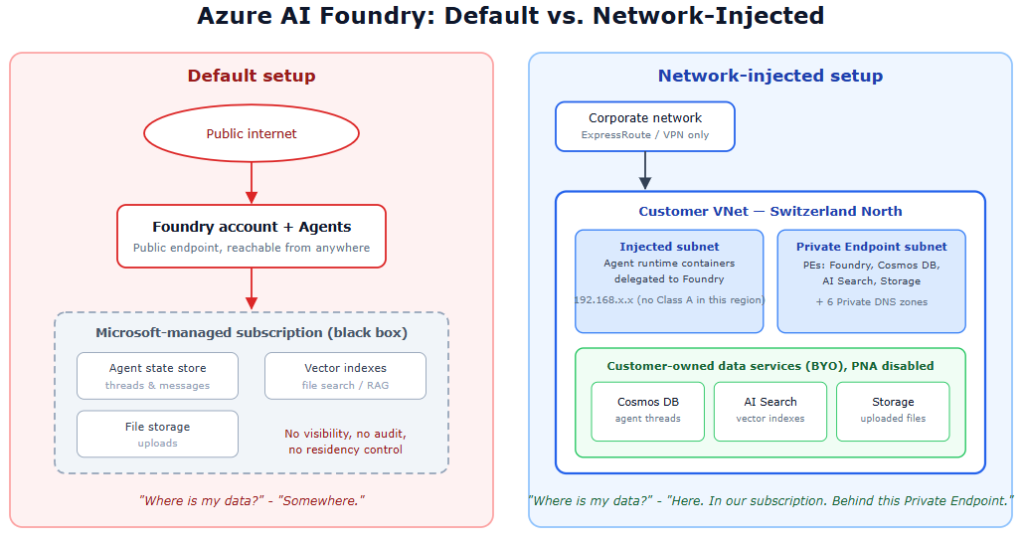
When you create a standard Azure AI Foundry account and start playing with Agents, everything just works – and that is exactly the problem for regulated environments. In the default setup:
- The Foundry endpoint is reachable from the public internet
- The Agent Service stores its state (threads, messages, files, vector stores) in Microsoft-managed resources you cannot see, audit or control
- Your data-plane traffic to models and tools travels over public endpoints
For a non-regulated environment – fine. In the regulated world under FINMA, ISO 27001 or ISAE requirements, the security officer will ask three questions within the first five minutes:
- Where exactly is my conversation data stored?
- Who can reach the endpoint?
- Can you prove it?
With the default setup, the honest answers are “somewhere in Microsoft’s subscription”, “anyone with credentials, from anywhere”, and “not really”. That conversation ends quickly.
And, yes, you can encrypt the traffic, but I will not write about that in the article
What network injection actually is
Network injection (Microsoft also calls it “network-secured” or “standard agent setup with private networking”) flips the model around. Instead of the Agent Service running its workloads in Microsoft’s network and storing state in Microsoft-managed resources, you inject the agent runtime into your own VNet and bring your own data services:
- Your own Cosmos DB – stores threads and agent state (the platform creates an
enterprise_memorydatabase in it) - Your own Azure AI Search – stores vector indexes for file search / RAG
- Your own Storage Account – stores uploaded files
- A delegated subnet in your VNet where the agent containers actually run
Combined with Private Endpoints for the Foundry account and all three data services, plus Public Network Access disabled everywhere, you end up with an architecture where:
- The Foundry endpoint resolves to a private IP and is only reachable from inside your network
- Every byte of agent state lands in resources that live in your subscription, your region, your compliance boundary
- Microsoft operates the model inference – and only that
Why people do it (the sovereignty angle)
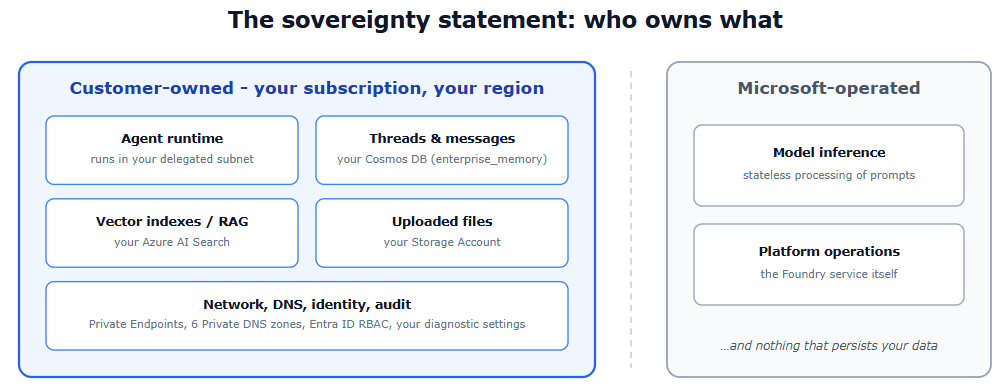
For me the strongest argument is not “security” in the abstract, but a very concrete sovereignty statement you can put in front of an architecture review board:
The agent’s memory – every thread, every message, every uploaded document, every vector index – is stored in customer-owned resources, in a Swiss region, behind private endpoints. Microsoft’s role is reduced to operating the model inference.
That is a fundamentally different risk profile than “trust us, it’s stored somewhere in the service”. It turns the Agent Service from a black box into something you can put on an architecture diagram, point at each component, and say: this is ours, this is in Switzerland, here is the Private Endpoint, here is the audit log.
The practical drivers I see with clients:
- Data residency – agent state must physically stay in a specific region
- Network isolation – no public ingress to the AI workload, full stop; access only via ExpressRoute / VPN / peered VNets
- Auditability – Cosmos DB, AI Search and Storage are your resources, so your diagnostic settings, your Defender for Cloud, your backup policies apply
- Exit strategy – your data sits in standard Azure services you own; you are not dependent on a service-internal store you can neither export from nor inspect
The architecture in one picture
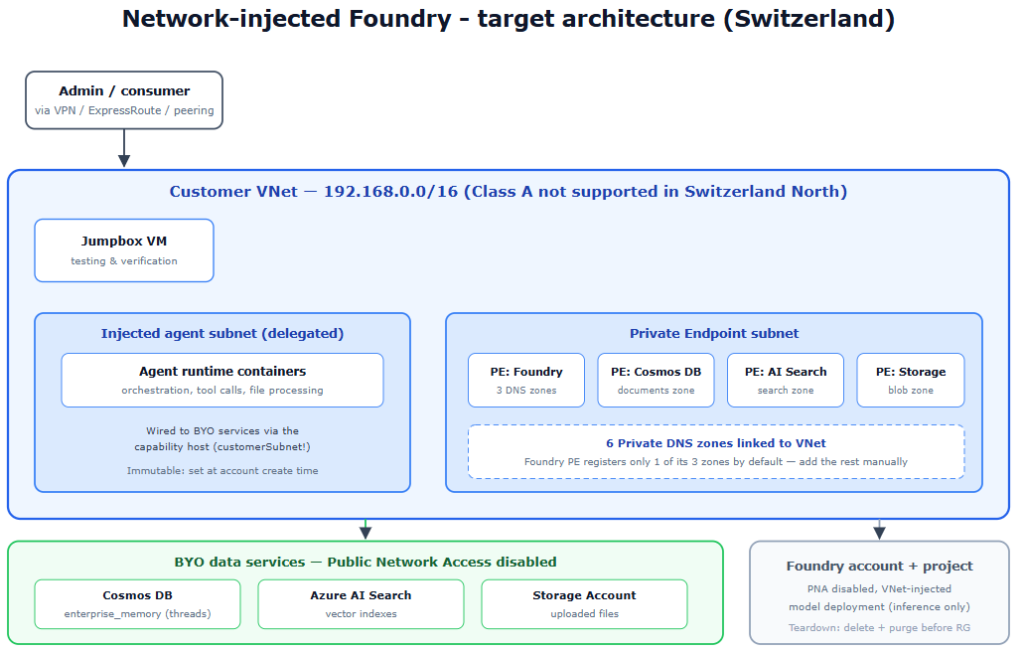
The reference Setup looks like this:
- 1 VNet with two subnets: one for the injected agent runtime (delegated to the Foundry platform) and one for Private Endpoints
- 1 Foundry account with VNet injection enabled at create time + 1 project
- BYO Cosmos DB, AI Search and Storage Account, all with Public Network Access disabled
- Private Endpoints for all four services (Foundry account + the three data services)
- 6 Private DNS zones linked to the VNet
- A jumpbox VM inside the VNet for testing and administration
Note that this does not take into account redundancy and disaster recovery, so in a real Prod you need to build that in too – or plan on a very exciting Monday.
Best practices (and the traps nobody warns you about)
This is the part where the official documentation and reality diverge a little. Everything below cost me time, so it doesn’t have to cost you any.
1. Decide on injection before you create the account
You cannot retrofit the delegated agent subnet onto an existing Foundry account. To be precise about what is and isn’t fixed: Private Endpoints for ingress can be added to an existing account later, but the injection of the agent runtime into your subnet – the part that actually moves the workload into your network – cannot. If a customer says “let’s start simple and lock it down later” – for the ingress side, maybe; for the runtime, no. Later means redeploy.
2. Check your region’s subnet addressing requirements
Not every RFC 1918 range works everywhere. Class A ranges (10.x.x.x) are only supported in a specific list of regions – and Switzerland North is not on it. There you must use Class B (172.16.x.x) or Class C (192.168.x.x) for the agent subnet. I went with Class C. If your corporate IPAM hands you a 10.x.x.x range, the deployment fails with an error message that does not exactly point you to this. Two more sizing rules while you are at it: the delegated subnet must be at least a /27, /24 is recommended, and you cannot resize it afterwards – all projects in the account share it, so size for the concurrency you expect. Also check the reserved ranges that must not overlap with your VNet (172.30.0.0/16, 172.31.0.0/16, 100.64.0.0/11 and friends).
3. Plan all six Private DNS zones – the Foundry Private Endpoint only registers one
A Foundry account Private Endpoint needs three DNS zones
privatelink.cognitiveservices.azure.com
privatelink.openai.azure.com
privatelink.services.ai.azure.com
but by default only one of them gets registered. Add the missing zone groups manually, or the endpoint will resolve publicly for some FQDNs and you will chase ghost connectivity issues. Together with the zones for Cosmos DB, AI Search and Blob Storage you end up with six zones linked to the VNet.
4. RBAC timing on Cosmos DB matters
The Cosmos DB data-plane role assignment for the project identity must happen after the capability host has created the enterprise_memory database – the role is scoped to it, and you cannot scope a role to a database that doesn’t exist yet. If your IaC assigns everything up front in one pass, this will fail. Sequence it.
5. Verify isolation with a test that cannot lie
‘It should be private now’ is not evidence. And be aware of what ‘blocked’ actually looks like: with Public Network Access disabled, the public FQDN still resolves to a public Azure edge IP – that is expected and not a misconfiguration. The block happens at the data plane, where the request comes back with HTTP 403 telling you public network access is disabled. My verification pattern:
- nslookup the Foundry endpoint from outside the VNet -> resolves to a public IP (fine), but an authenticated data-plane call returns 403
- nslookup from the jumpbox inside the VNet -> resolves to the Private Endpoint IP (192.168.x.x)
- Run the same authenticated data-plane call with the same credentials from both machines: 403 from your laptop, 200 from the jumpbox
Only when the identical call with identical credentials behaves differently depending on network location do you have proof of network isolation – and a screenshot for the security officer.
6. Don’t play with the portal
I built the entire setup on Azure CLI and it was totally worth it. My plan is to fold it into our landing zone.
When NOT to do this
To be fair with Microsoft, the default setup is also just working fine. And network injection is not free. You are signing up for six DNS zones, four Private Endpoints, three data services to size, patch-review and pay for, and an operational model where “just test it quickly from my laptop” no longer works. If your use case is an internal proof of concept with synthetic data, the default setup is the right choice – build there, and treat the injected setup as the production landing pattern for regulated workloads.
Summary
Network injection turns Azure AI Foundry Agents from a convenient black box into an architecture you can defend in front of a regulator: agent runtime in your subnet, agent memory in your Cosmos DB, AI Search and Storage, everything behind Private Endpoints in your region. The setup has sharp edges – immutable at create time, regional addressing rules, DNS zones that don’t self-register, a capability host with a creative relationship to HTTP status codes – but every one of them is manageable once you know it exists 🙂


